Scale Platform 2.0 launched
Scale Platform has been rebuilt from the ground up to help innovation teams move faster, make better decisions, and keep their entire portfolio visible.
This release brings a completely redesigned platform — faster, cleaner, and built around the way teams actually work. Every screen has been rethought to reduce friction, surface the right information at the right time, and let teams focus on building rather than reporting.
At the heart of this release is Max, Scale's AI co-worker, who now understands your organization's full context and works alongside your team throughout every project. Combined with new tools for portfolio visibility, structured business case tracking, and a flexible evidence workflow, this is the most capable version of Scale Platform yet.
Here's what's new.
For Teams
Redesigned Project Creation Wizard
Kick-start new projects in minutes instead of hours. The step-by-step creation wizard guides teams through setting up a project and optionally lets Max analyze uploaded materials to auto-populate project details and run an initial maturity evaluation. Go from a pitch deck to a fully structured project with baseline maturity scores in a single session.
Max Scale AI now understands your context
Work smarter and more efficiently with Max, your AI-powered co-worker in new business development. Max understands the full context of every project — maturity data, team composition, uploaded materials, and historical evidence — as well as organization-level information like company materials, innovation framework, and funnel configuration. Max uses that knowledge to help teams navigate uncertainty, spot patterns, and make smarter moves faster.
Ask Max for advice
Ask Max for advice directly from any evidence card while assessing a project. Max generates testable hypotheses with concrete success criteria, helping teams figure out what to do next instead of getting stuck. Max can also create and update evidence, search historical assessments, and modify project details — all through natural conversation.
Evidence Board
Keep every project moving forward with a clear, visual overview of what needs attention. The evidence board organizes all maturity objectives into status lanes — Backlog, Next Up, In Progress, Validated, and Blocked — so teams always know where to focus next. Drag and drop objectives between lanes as work progresses. When you need to reorganize quickly, unlock the board to move items freely without writing explanations for each change, then lock it back for rigorous evidence collection.
Forecast to Next Gate
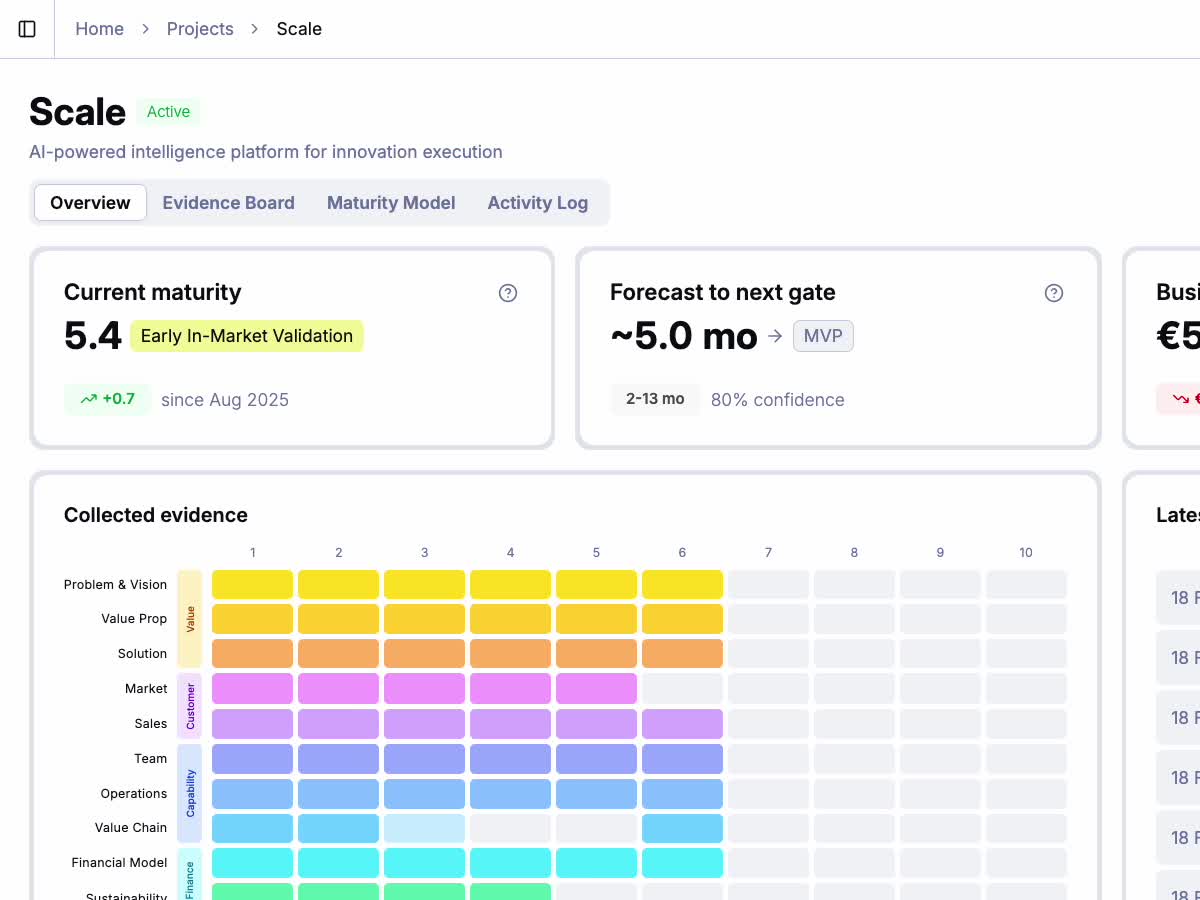
Know when each project is expected to reach its next gate or milestone. Scale uses Monte Carlo simulation to predict the time to the next maturity gate based on historical velocity. The forecast also appears as a column in the projects table, giving portfolio managers an instant view of estimated timelines across all initiatives.
Business Case Calculator
Build and maintain a solid business case for every project with structured financial modeling. Input TAM, SAM, SOM, and ARR estimates using industry presets and market size calculators. Select the business model (B2B or B2C) and let the platform calculate business potential automatically. Every field includes rationale capture, so the reasoning behind the numbers is never lost.
Business Case History
Track how the business case evolves over time with a complete audit trail. Every change to budget, market estimates, revenue projections, and business potential is recorded with timestamps. Compare current assumptions against earlier versions to see how the team's understanding of the market has matured — valuable for portfolio reviews and investment decisions.
Maturity Matrix Redesign
Assess projects faster and with more clarity. The redesigned maturity matrix groups related objectives by category with color-coded headers, and adds level filters so you can focus on the areas that matter most. Horizontal scroll arrows make it easy to navigate large maturity models, and the two-column layout gives each objective more room to breathe.
Evidence Card Improvements
Collect and evaluate evidence more efficiently. The redesigned evidence card puts the workflow status right in the editor toolbar for quick access. A built-in hypothesis coach suggests concrete actions to validate each objective. And when you need guidance, the "Ask for advice" button opens a conversation with Max pre-loaded with the objective's full context — no need to explain what you're working on.
For Portfolio Management / Leadership
Organization Profile
Configure your organization's innovation framework from a single place. The organization profile brings together general information, organizational units, innovation funnel phases, maturity gates, and shared company materials — all in a clean, tab-based interface. Define how your funnel maps to maturity levels, set gate thresholds that projects must pass, and upload company-wide materials that Max uses as context across all projects.
Portfolio Bubble Chart
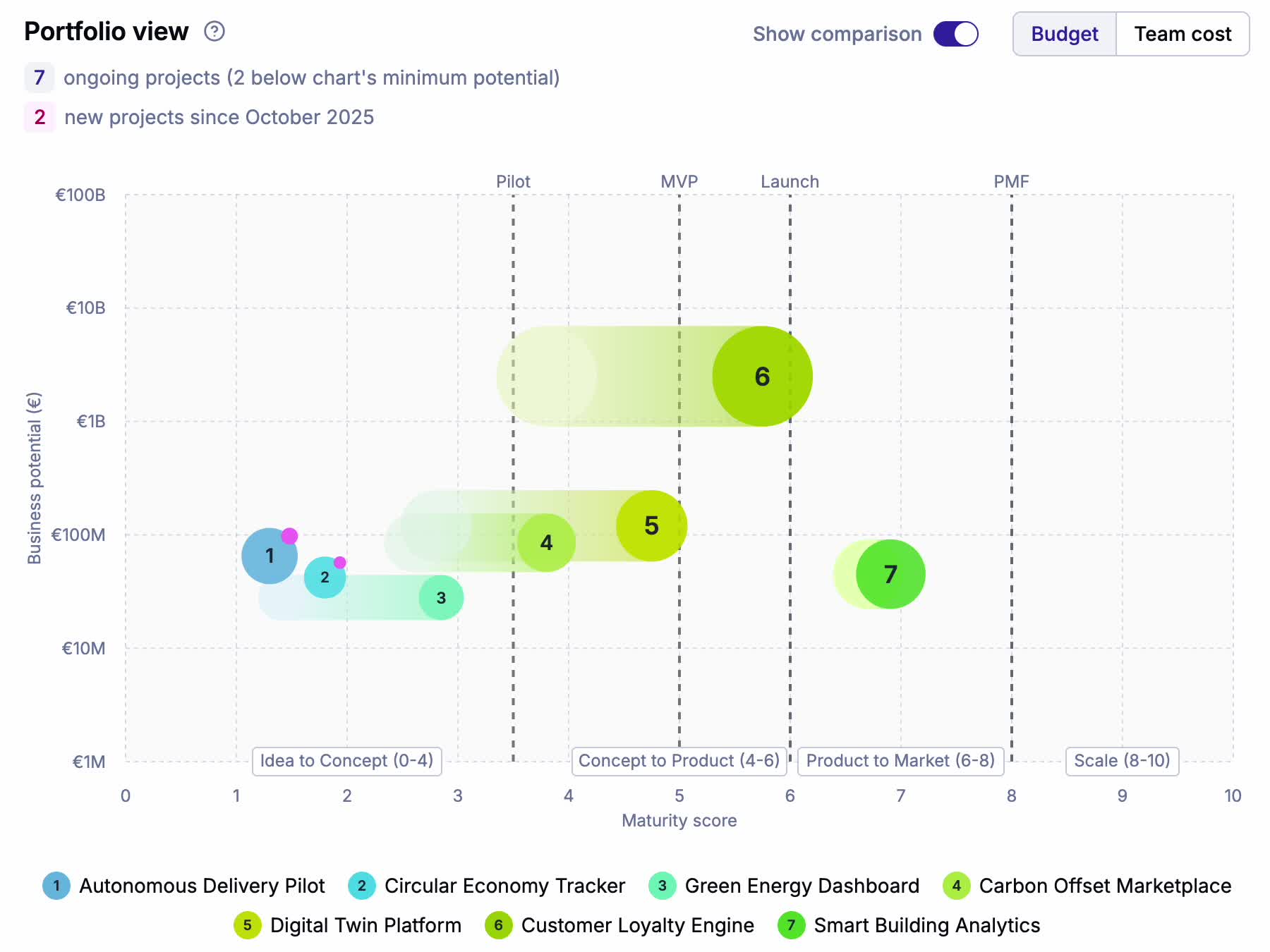
Understand your entire innovation portfolio in a single view. The redesigned portfolio bubble chart plots every active project by maturity score and business potential, with bubble size reflecting budget or monthly team cost. Maturity phases and gate milestones appear directly on the chart, so you can instantly see which projects are approaching a decision point and which need more runway.
Turn on comparison mode to see how the portfolio has evolved over time. Historical positions appear as faded bubbles connected by dotted lines to the current state, making it easy to spot which projects are accelerating, which are stalled, and which are brand new.
Innovation Funnel Chart
See the health of your entire innovation portfolio at a glance. The funnel chart on the dashboard shows how projects are distributed across maturity phases — from early exploration to market-ready — with counts and percentages at each stage. Quickly spot bottlenecks where too many projects are stuck and identify phases that need more attention or resources.
Innovation Funnel & Gates Configuration
Tailor Scale Platform to match your organization's innovation process. Map maturity levels to your funnel phases (e.g., "Idea to Concept", "Concept to Product") and define the gates that projects must pass to advance. This creates a shared framework for innovation execution across the entire organization, ensuring everyone speaks the same language and measures progress the same way.
My Active Projects & Follow Projects
Your sidebar automatically shows the active projects where you're a team member, so you always have one-click access to the work that matters most. No configuration needed — as soon as you're added to a project team, it appears under "My Active Projects" in the sidebar, and disappears when the project is no longer active.
For projects where you're not on the team but still want visibility, use Follow. Follow any project to pin it to your sidebar for quick access, regardless of your team membership or the project's status. Ideal for portfolio managers, sponsors, and stakeholders who need to keep an eye on multiple initiatives without cluttering the teams doing the work.
Organization Unit Filtering
Focus on what matters to you. Filter the dashboard and projects table by organizational unit to see only the initiatives relevant to your team or business area. Your selected filter persists across sessions and syncs across browser tabs, so you always see a consistent view of your portfolio.
Batch Edit Themes
Organize your portfolio at scale. Select multiple projects from the projects table and apply or remove tags in a single action. Keep your portfolio consistently categorized as it grows, making it easier to filter, compare, and report on groups of related initiatives.